
Companion by Identifor3.4.4 - Google Play
You'll be able to see results in few seconds.
Publisher Description


Companion Description
When parents, teachers, and aides are no longer around to answer questions and help with various needs throughout the day, who can help? Identifor’s Companion can.
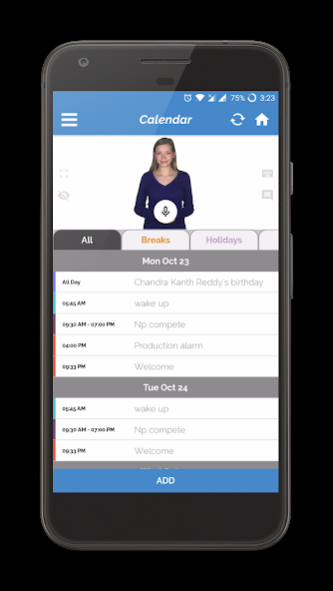
Companion works on your smartphone and is specifically designed to help a person address various needs and challenges throughout the day. It uses a human avatar named Abby to answer your questions. Abby can even help with:
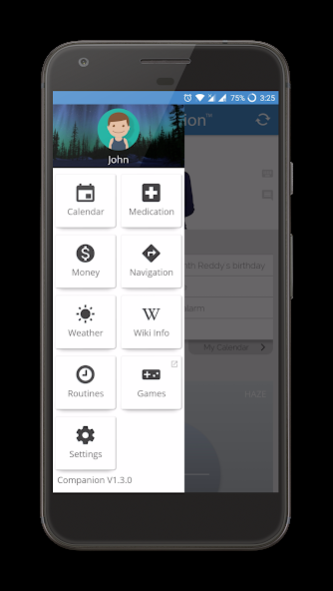
• Calendar management — everything goes on the calendar to stay organized.
• Reminders for anything you can imagine (morning wake up calls, medications, daily bedtime, weekly laundry, social engagements, etc.).
• Reminders delivered via phone call, SMS, phone alerts and/or Abby pop-up.
• School schedules — class times and locations, exam dates, labs, etc.
• Work schedules — start/end times for work and breaks (including reminders).
• Navigation — public transit, walking/driving directions, and even Uber.
• Money — split bills, tips, bills/coins combinations, expected change.
• Weather — plan clothing & accessories based on daily weather, etc.
• Wikihow and Wikipedia — prepare meals, fix things around the house, etc.
The more you use Companion, the more Abby will learn your routines and provide more targeted (and proactive) assistance.
While Companion was designed for teens and adults with Autism Spectrum Disorder, it can really help anyone who can benefit from its various modules.
About Companion by Identifor
The company that develops Companion by Identifor is Identifor. The latest version released by its developer is 3.4.4.
To install Companion by Identifor on your Android device, just click the green Continue To App button above to start the installation process. The app is listed on our website since 2021-06-23 and was downloaded 0 times. We have already checked if the download link is safe, however for your own protection we recommend that you scan the downloaded app with your antivirus. Your antivirus may detect the Companion by Identifor as malware as malware if the download link to com.identifor.companion is broken.
How to install Companion by Identifor on your Android device:
- Click on the Continue To App button on our website. This will redirect you to Google Play.
- Once the Companion by Identifor is shown in the Google Play listing of your Android device, you can start its download and installation. Tap on the Install button located below the search bar and to the right of the app icon.
- A pop-up window with the permissions required by Companion by Identifor will be shown. Click on Accept to continue the process.
- Companion by Identifor will be downloaded onto your device, displaying a progress. Once the download completes, the installation will start and you'll get a notification after the installation is finished.
Program Details
System requirements
Download information
Pricing
Version History
version 3.4.4
posted on 2021-06-23
Bug fixes and enhancements
version 3.4.2
posted on 2020-10-07
Performance improvements.
version 3.3.6
posted on 2019-12-31
Bug fixes and improvements
version 3.3.5
posted on 2019-09-05
Uber navigation switch to Uber app for showing fare/time estimation.
version 1.3.0
posted on 2017-10-23
Sync performance improvement
Bug fixes
version 1.0.0
posted on 2016-12-07
Disclaimer
Official Google Play Link
We do not host Companion by Identifor on our servers. We did not scan it for viruses, adware, spyware or other type of malware. This app is hosted by Google and passed their terms and conditions to be listed there. We recommend caution when installing it.
The Google Play link for Companion by Identifor is provided to you by apps112.com without any warranties, representations or guarantees of any kind, so access it at your own risk.
If you have questions regarding this particular app contact the publisher directly. For questions about the functionalities of apps112.com contact us.
